Python / PostgreSQL / React
PGG ERP
Enterprise resource planning system for a manufacturing operation. Inventory, production scheduling, vendor reconciliation, and finance close.
7
end-to-end operations
Showcase
Product Walkthrough
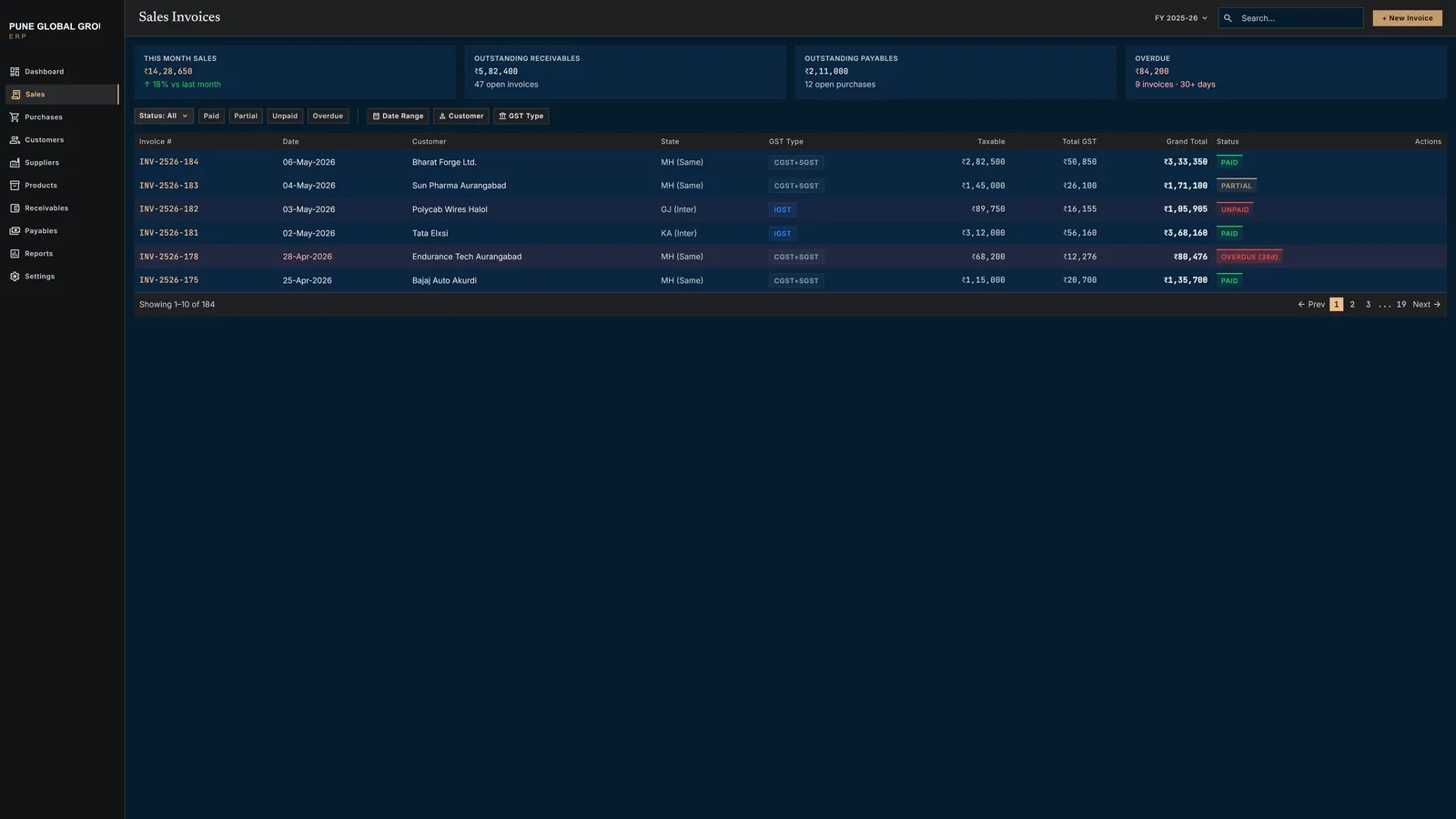
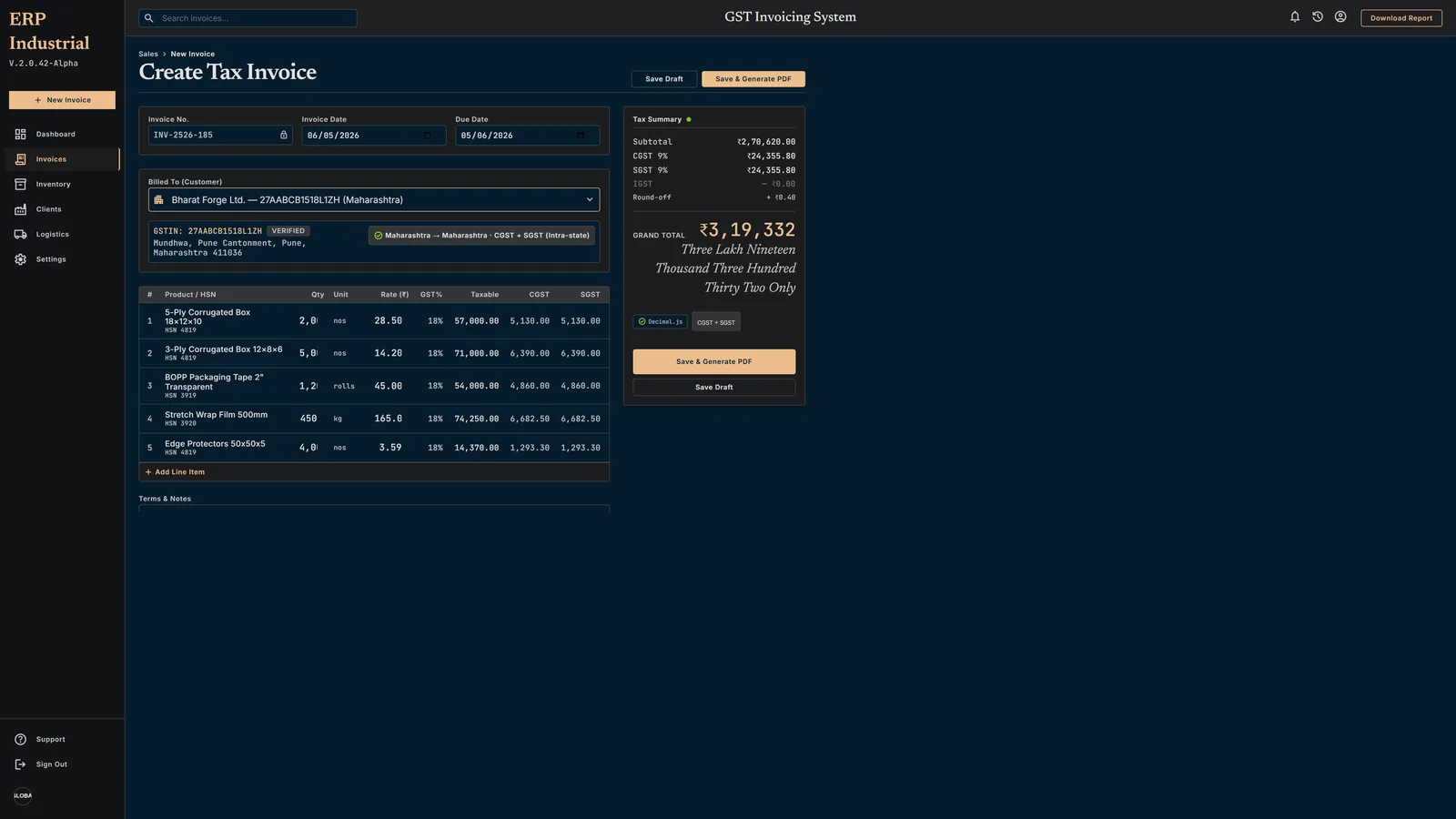
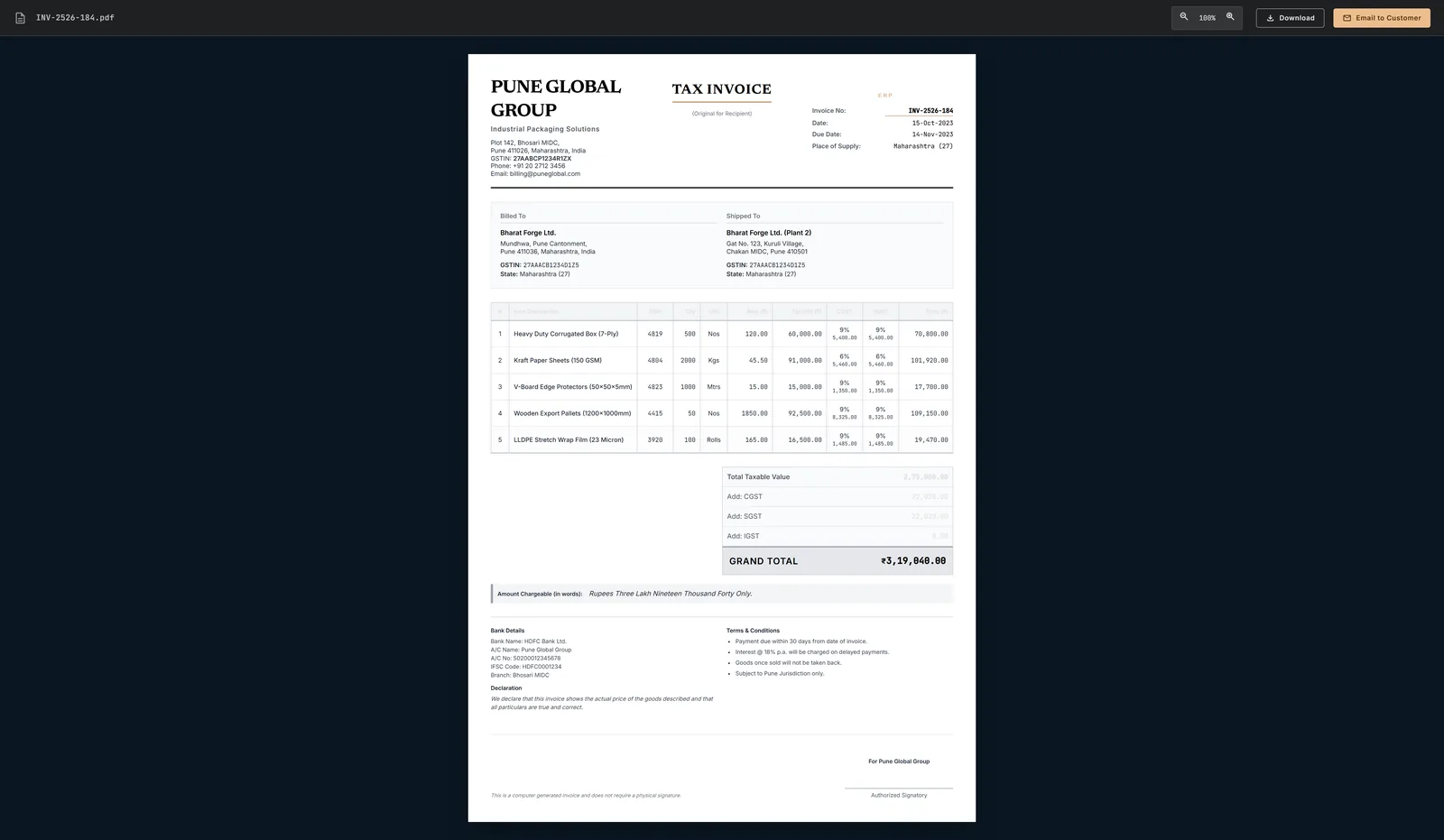
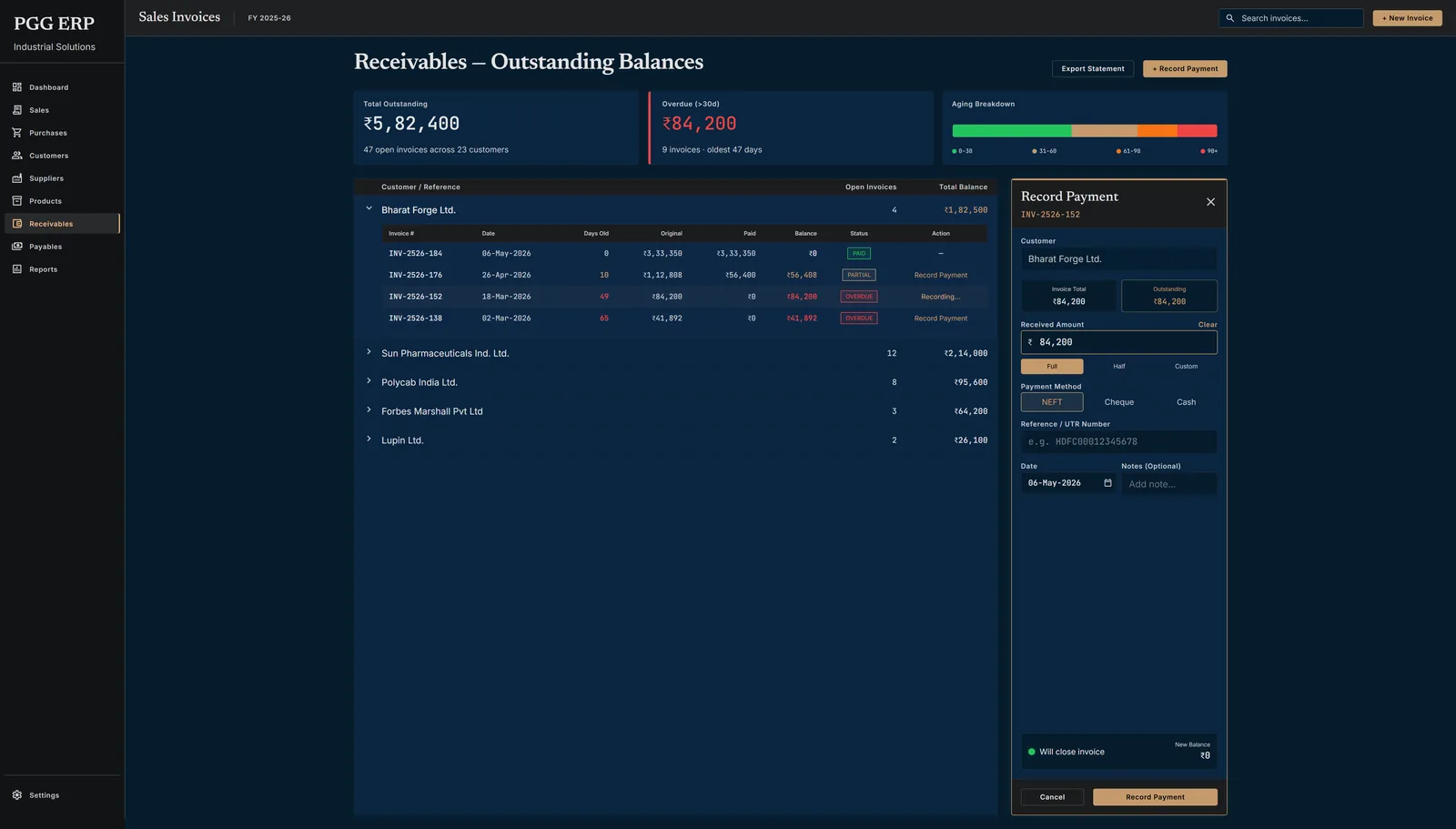
Four screens from the production GST invoicing system serving Pune Global Group — Express + EJS + Prisma + PostgreSQL on Cloud Run.
Leadership Lens
01 The Call
Chose to build a purpose-fit, server-rendered ERP over adopting an off-the-shelf solution (Tally, SAP B1, Zoho Books), recognising that for a lean manufacturing operation with specific GST-bifurcation requirements and a single operator, a custom tool would be faster to use, cheaper to run, and easier to maintain than any SaaS subscription that forces an over-engineered workflow.
02 The Bet
Bet that a no-SPA, no-build-step architecture (Express + EJS + Prisma) would be faster to ship, easier for a non-technical operator to use, and robust enough for daily production invoicing — accepting that it would never have the feature breadth of commercial ERP software.
03 The Trade-off
Sacrificed multi-user access, role-based permissions, and a polished consumer UI (single master-password auth, no roles, plain CSS) in exchange for a system that fits on a Cloud Run container, scales to zero, and can be fully understood and modified by one engineer.
04 The Outcome
Pune Global Group gained a production-ready invoicing system covering the full operations cycle — outgoing sales invoices with auto-numbered GST-compliant PDFs, purchase recording, and both receivables and payables tracking — replacing a manual or ad-hoc process and eliminating the risk of incorrect tax bifurcation that could trigger GST notices.
05 Coordinated
Aligned with the Pune Global Group operations team on GST compliance requirements (CGST/SGST vs IGST split rules, HSN codes per product line, Indian financial-year invoice numbering reset on April 1) and the business configuration (single GSTIN, state code for intra/inter-state determination). Scoped the system to a single-operator internal tool so that no training programme or multi-seat rollout was required, which was the key sign-off condition from the client side.
06 Where this goes next
Add a dashboard with receivables/payables ageing summary and monthly GST liability report; extend purchase module with a goods-received note workflow; explore an e-invoicing (IRP/IRN) integration to automate GSTN submission for invoices above the e-invoice threshold.
01 Chapter 1
The Business Problem: GST Compliance for a Lean Operation
Pune Global Group operates as a general trading and retail business in India. The core operational need was a local-first invoicing system that handles Indian GST compliance correctly — CGST/SGST for intra-state transactions and IGST for inter-state ones — while also managing suppliers, purchase tracking, and payment receivables/payables.
Off-the-shelf tools like Tally or Zoho are either too heavyweight, too expensive for the volume, or lack the customisation needed for a lean manufacturing operation. The requirement was a fast, server-rendered tool that a single operator can use without training, deployed to the cloud but functional even on a local network.
Compliance Constraint
Indian GST law mandates correct tax bifurcation: intra-state sales must split GST into equal CGST + SGST halves, while inter-state sales must charge the full rate as IGST. Getting this wrong results in tax notices and penalties.
Modules
7
End-to-end operations
Prisma Models
9
Fully relational
GST Rates
5+
Per line item
PDF Engine
A4
Pixel-perfect invoices
02 Chapter 2
Module Breakdown
The ERP is organised into six tightly integrated modules, each handling a distinct part of the business workflow. All modules share a common product catalog and GST engine.
Module A — Customers & Suppliers
Full CRUD for buyers and vendors. Stores GSTIN, state code, business name, phone, and address. State is used to auto-determine GST type (intra vs inter-state).
Module B — Products
Shared catalog used in both sales and purchases. Each product stores name, HSN code, unit, GST rate, and base price — single source of truth across all transactions.
Module C — Sales (Invoicing)
Create outgoing invoices with dynamic line items. Auto-numbering (INV-2526-001), automatic GST calculation, customer dropdown, and notes field. PDF download on detail page.
Module D — Purchases
Record incoming invoices from suppliers (PUR-2526-001). Tracks vendor's own invoice reference. Same dynamic line items and GST engine as sales, but on the payables side.
Module E — Payments (Receivables)
Track money owed by customers. Lists all sales with outstanding balances. Record partial or full payments against specific invoices with method and notes.
Module F — Payments Out (Payables)
Track money owed to suppliers. Lists all purchases with outstanding balances. Record payments to vendors with method tracking (cash, NEFT, UPI).
03 Chapter 3
GST Engine
The GST calculation logic is the heart of the system. A single shared service (src/services/gst.js) handles tax computation for both sales and purchases, ensuring consistent behaviour across the application.
Tax Determination Logic
determineGstType(businessState, counterpartyState) // If business state === customer/supplier state → "CGST_SGST" (split rate equally into CGST + SGST) // If business state !== customer/supplier state → "IGST" (full rate goes to IGST column)
Line Item Computation
computeLineItem(qty, unitPrice, gstRate, gstType) taxableAmount = qty * unitPrice // If CGST_SGST: cgst = taxableAmount * (gstRate / 2) / 100 sgst = taxableAmount * (gstRate / 2) / 100 igst = 0 // If IGST: cgst = 0 sgst = 0 igst = taxableAmount * gstRate / 100 lineTotal = taxableAmount + cgst + sgst + igst
Decimal.js — No Float Math
All monetary calculations use Decimal.js to avoid floating-point rounding errors. Native JS floats are never used for money. This prevents the classic 0.1 + 0.2 !== 0.3 problem in financial software.
Intra-State
CGST+SGST
Equal split of GST rate
Inter-State
IGST
Full rate, single column
Rates Supported
Any %
Per product, per line
04 Chapter 4
PDF Generation
Every sales invoice can be downloaded as a pixel-perfect A4 PDF, generated server-side using Puppeteer (headless Chromium). The PDF template is a dedicated EJS file (views/invoice-pdf.ejs) with no navigation chrome — purely formatted for print.
| Section | Content |
|---|---|
| Header (Left) | Business name, address, GSTIN, phone |
| Header (Center) | "TAX INVOICE" heading (bold) |
| Header (Right) | Invoice No (INV-2526-XXX) + Date |
| Bill To | Customer name, address, GSTIN, state |
| Line Items | Sr | Description | HSN | Unit | Qty | Rate | Taxable | CGST% | CGST | SGST% | SGST | IGST% | IGST | Total |
| Totals | Subtotal | Total CGST | Total SGST | Total IGST | Grand Total |
| Footer | Amount in words (Indian system) + Notes + "Computer generated invoice" |
Cloud Run Safe Config
Puppeteer launches with --no-sandbox and --disable-setuid-sandbox flags. The executable path is configurable via PUPPETEER_EXECUTABLE_PATH env var for containerised deployments.
PDF Generation Flow
05 Chapter 5
Data Model
The system uses 9 Prisma models backed by PostgreSQL 15. The schema enforces referential integrity through foreign keys and supports auto-incrementing invoice numbers per financial year via atomic DB transactions.
| Model | Purpose | Key Fields |
|---|---|---|
| Business | Single-row company config | name, gstin, state, address, phone |
| Customer | Buyers (linked to Sales) | name, gstin, state, phone, address |
| Supplier | Vendors (linked to Purchases) | name, gstin, state, phone, address |
| Product | Shared catalog (Sales + Purchases) | name, hsn, unit, gstRate, basePrice |
| Sale | Outgoing invoice | invoiceNo, date, customerId, gstType, grandTotal |
| SaleItem | Line items on a sale | saleId, productId, qty, unitPrice, cgst, sgst, igst |
| Purchase | Incoming invoice from supplier | purchaseNo, date, supplierId, gstType, grandTotal |
| PurchaseItem | Line items on a purchase | purchaseId, productId, qty, unitPrice, cgst, sgst, igst |
| Payment | Receivables (money from customers) | saleId, amount, method, date, notes |
| PaymentOut | Payables (money to suppliers) | purchaseId, amount, method, date, notes |
Invoice Number Generation
Sales: INV-YYXX-NNN (e.g. INV-2526-001) Purchases: PUR-YYXX-NNN (e.g. PUR-2526-001)
// YY = FY start year (25 for 2025-26) // XX = FY end year (26 for 2025-26) // NNN = zero-padded sequential, resets each April 1 // Both sequences are independent — atomic DB transaction
Key Relationships
Sale → Customer (many-to-one), SaleItem → Product, Payment → Sale. Purchase → Supplier (many-to-one), PurchaseItem → Product, PaymentOut → Purchase. Product is shared across both sales and purchases.
06 Chapter 6
Architecture
The system is intentionally simple: a pure server-rendered architecture with no SPA framework, no build step, and no client-side routing. This makes it fast to develop, easy to debug, and trivial to deploy.
Request Flow
Authentication
Single master password stored as a bcrypt hash in environment variables. Session-based authentication using express-session with connect-pg-simple for session storage in PostgreSQL. No multi-user, no roles — this is an internal tool for one operator.
Design Decisions
NO SPA — Pure server-rendered HTML via EJS. No React, no Vue, no build step. Pages load instantly, forms work without JavaScript (progressive enhancement for dynamic line items only).
STORED TOTALS — All GST amounts and grand totals are computed on POST and stored in the database. Views never recompute — they display what was stored. This prevents drift and ensures PDF accuracy.
ATOMIC INVOICE NUMBERS — Invoice and purchase numbers are generated inside a DB transaction to prevent duplicates under concurrent access. The sequence resets each financial year (April 1).
LOCAL-FIRST DEPLOY — Designed to run on localhost for daily use. Cloud Run deployment is the target for remote access, but the app functions perfectly without internet connectivity.
Route Structure
SALES & INVOICING GET /sales — List all invoices GET /sales/new — Invoice form (dynamic line items) POST /sales — Create invoice + compute GST GET /sales/:id — Detail view + payment history GET /sales/:id/pdf — Download PDF (Puppeteer)
PURCHASES GET /purchases — List all purchases GET /purchases/new — Purchase form (supplier dropdown) POST /purchases — Create purchase + compute GST GET /purchases/:id — Purchase detail view
PAYMENTS GET /payments — Receivables — outstanding from customers POST /payments — Record payment received GET /payments-out — Payables — outstanding to suppliers POST /payments-out — Record payment made
07 Chapter 7
Tech Stack
| Layer | Technology | Reason |
|---|---|---|
| Runtime | Node.js 20 LTS | Cloud Run compatible, fast startup |
| Web Framework | Express 4 | Minimal, battle-tested, fast |
| Templating | EJS | No build step, server-rendered HTML |
| ORM | Prisma | Type-safe queries, migration support |
| Database | PostgreSQL 15 | Cloud SQL target, ACID guarantees |
| Puppeteer (Chromium) | Pixel-perfect HTML to PDF rendering | |
| Auth | bcrypt + express-session | Simple master password, session store in PG |
| Math | Decimal.js | Precise monetary calculations (no float) |
| Deploy Target | Cloud Run | Serverless container, scales to zero |
Project Layout
invoicer/ server.js — Express entry point prisma/schema.prisma — 9 models, migrations src/routes/ — customers, suppliers, products, sales, purchases, payments, paymentsOut src/services/gst.js — GST calculation (shared sales + purchases) src/services/pdf.js — Puppeteer PDF generation src/services/invoiceNo.js — Auto-numbering (FY-aware) src/middleware/auth.js — Master password session check views/ — EJS templates (layout, dashboard, CRUD forms) views/invoice-pdf.ejs — PDF-only template (no nav) public/style.css — Single CSS file, no build